I've got an upgrade :)
Testing http://www.speedtest.net....
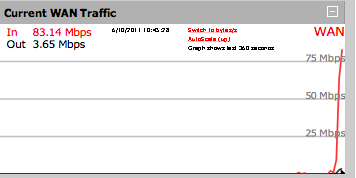
Real world download of Knoppix Linux via BitTorrent...
I am lost....
So I just placed a renewal order on Domainsatcost.ca for two domains, and got these two error messages:
- Your Transaction has been declined. Please click continue to try again or to verify your credit card information. If you continue to experience problems with this transaction please contact your credit card company.
- We're sorry, an error has occurred during processing for the following items: XXX.ca, YYY.ca. Customer Service will manually correct and process the items, please do not place another order. Your credit card has been billed.
I ask with tears in my eyes, what should I do now? Deadlock......
Disable RTF for a contact in Outlook 2010
Recently I had to find a way how to disable sending RTF based emails via Microsoft Exchange to recipients that do not have Exchange and that subsequently receive winmail.dat extensions for attachments added to the email due to Exchange's RTF parsing logic.
Seems like it turned out to be trivial, but very hard to find if you do not know where to look. Follow these steps:
- You can do this either by opening the Outlook Contact, or from a new email.
- Hover your mouse over the email recipient, and in the popup click Outlook Properties in the bottom right drop down icon.
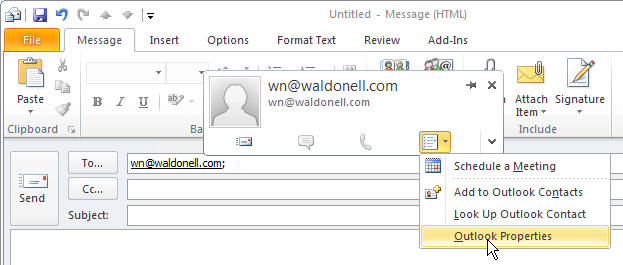
Outlook Screen 1 - In the Outlook Contact page, hover your mouse over the email address again, and click Outlook Properties again from the bottom right drop down icon.
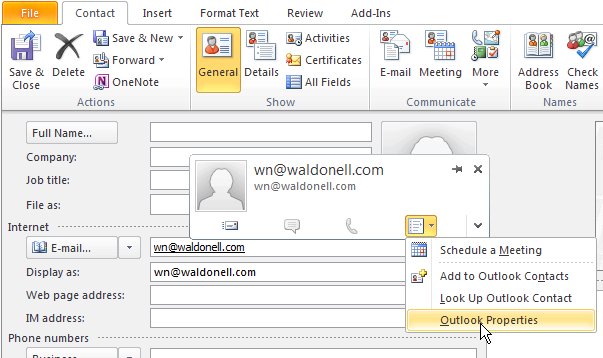
Outlook Screen 2 - In the email properties dialog box, select Send Plain Text only.
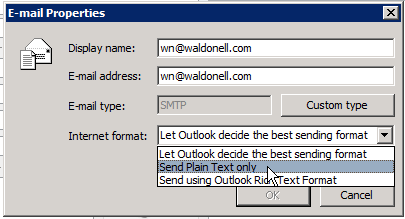
Outlook Screen 3 - Click ok and you are done.
Give a child a spoon and...
...they will entertain themselves for many precious minutes...

Summer has arrived - finally!
This weekend marked the first consistent period of above 22C temperatures and sunshine. Truly remarkable... We had winter up to end of May.