Mail.app in Lion is BUGGY
Optimising PostgreSQL application Part II
Review Part I here. The best I could muster was 21 minutes in a co-located setup. To make the comparison fair, I am going to express it as a percentage of the pre-optimisation application / PostgreSQL DB on production versus my development machine.
| Production App | Production DB | Development Co-located | |
|---|---|---|---|
| CPU | 2 x Xeon 5140 2.33GHz (#4) | 1 x Xeon 5140 2.33GHz (#2) | Core i7 2600 3.4GHz (#4) |
| RAM | 4GiB | 4GiB | 12GiB |
| HDD | Enterprise SAN | Enterprise SAN | OCZ Vertex 3 240GB SSD |
| NIC | Broadcom Gigabit BCM5708S | Broadcom Gigabit BCM5708S | Intel Gigabit 82579V |
| PostgreSQL | - | fsync = off | fsync = on, synchronous_commit = off |
| Application | Unoptimised, single threaded | - | Optimised, multithreaded |
The performance increase between the Production App + Production DB server combo vs. my co-located development machine?
OCZ Vertex 3 240GB SSD Performance Fixed
I recently purchased an OCZ Vertex 3 SSD 240GB to perform some PostgreSQL DB performance profiling on a large (80GB) database for one of my clients. I paid a premium of $600 for only 240GB purely because I wanted an SSD that does > 520GB/s read/write. To ensure I do indeed attain those speeds, I ensured my Gigabyte motherboard supported SATA3 at 6Gbps. It is no use connecting an SSD that does > 300MB/s to a SATA2 port, as SATA2 is limited to 3Gbps which translates to 300MB/s if you keep in mind 20% overhead is spent on the 8b/10b encoding scheme.
It follows that I was shocked to learn that I only managed to get 340MB/s read and 240MB/s write from the SSD connected to the onboard SATA3 port, with a Core i7 950 CPU. That is the same than an entry level SSD, which would have cost a third of the price!
After some troubleshooting I found this article. It turns out the onboard SATA3 ports on my Gigabyte X58A-UD3R are driven by a Marvell 9128 controller, which - to put it elegantly - sucks. This controller sits on a PCIe 1x bus as far as I gathered. PCIe 1x has a bandwidth of 5Gbps, which translates to 400MB/s. In real life, the effective transfer rates were much lower.
Exchange ActiveSync failures Part 2
I recently had another instance where mobile phones (Android) refused to connect to an Exchange 2003 server. Using https://www.testexchangeconnectivity.com/, it stopped at
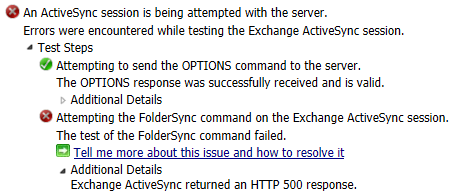
The help at Microsoft was misleading because I have already followed those steps. In this case, the issue was resolved by removing the Host Header Value from the Default Web Site in IIS:
Finding lines in a text file with differing lengths
I recently had to find out whether a very large text file had any lines where the length (character count) of each line differed, as they needed to be identical. This will help:
cat file.txt | awk '{gsub(/[ \t]+$/,""); print length($0)}' | sort -u